
Gateway FHX2300 bmid 23" Widescreen LCD
We apologize but this item is currently unavailable. Please feel free to browse our website for other available items.
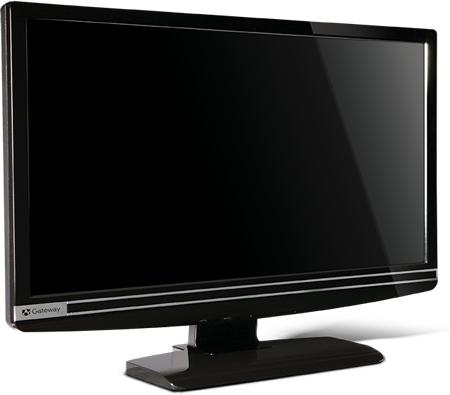
Enlarge
*Note this image is for descriptional purposes.
Actual product may vary.
Actual product may vary.
Description
Gateway FHX2300 bmid 23" widescreen LCD is a best-in-class powerhouse display ready for the most graphics-intensive gaming, entertainment and productivity apps. This gorgeous monitor has a slim design that would showcase any decor and a glossy black bezel that extends down to the sturdy L stand. The FHX2300 bristles with impressive specifications: 1080p support with HDCP, 1920 x 1080 HD resolution, 40000:1 contrast ratio, and up to 5ms response time. And it boasts DVI, HDMI and VGA video inputs.
Specifications:
| Product Type | Gateway 23" Recertified LCD Monitor |
| Series Name | FHX2300 |
| Display | 23-inch (diagonal) widescreen LCD |
| Active Display Area | 17.43 × 9.80 inches (442.8 × 249.08 mm) |
| Pixel Pitch | 0.2655 mm |
| Maximum Resolution | 1920 × 1080 |
| Maximum Refresh Rate | 60 Hz |
| Screen Treatment | Ultrabright |
| Panel Technology | LCD active matrix TFT |
| Response Time | 5 ms |
| Contrast Ratio | 40,000:1 (Max) |
| Brightness | 300 cd/m2 |
| Viewing Angles (CR = 10) | Horizonal: 160° Vertical: 160° |
| Number of Colors | 16.7 million |
| Input Signal | One VGA port One DVI-D port with HDCP One HDMI port with HDCP One PC Audio port |
| Speakers | 2 × 2W |
| VESA Wall Mounting | 100 × 100 mm |
| Power Consuption | Under 70w |
| Agency Certifications | Energy Star®, UL, cUL, CSA, FCC Class B, CE, NOM, VCCI, TUV/GS and RoHS |
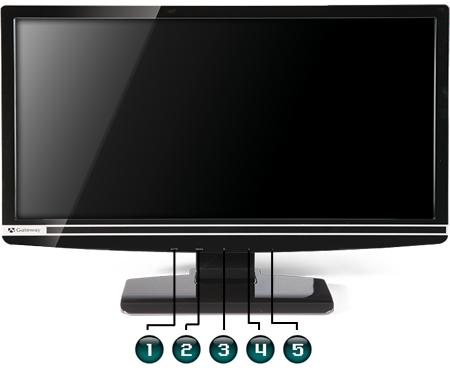
| Number | Description |
|---|---|
| 1. | Auto button Pressing the Auto button to automatically configure the settings. In the Settings menu, pressing the Auto button will return to the previous menu. |
| 2. | Menu button, press to bring up the menu for the monitor. |
| 3. | Power button, used to power on or off the monitor. |
| 4. | Left button, used to access quick-key functions, and are used to select a setting in menus. Pressing the Left button to change the volume. |
| 5. | Right button, used to access quick-key functions, and are used to select a setting in menus. Pressing the Right button to select a pre-defined Theme setting. |
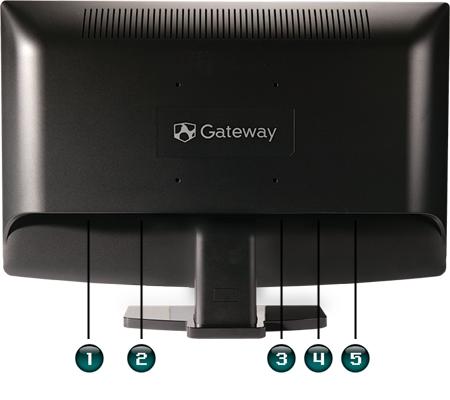
| Number | Description |
|---|---|
| 1. | DC-in jack |
| 2. | Audio-in jack |
| 3. | HDMI out jack, if the unit is equiped. |
| 4. | DVI-D display port |
| 5. | VGA display port |