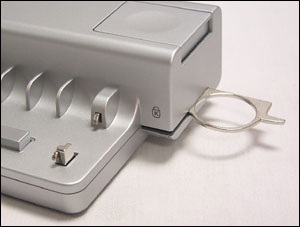
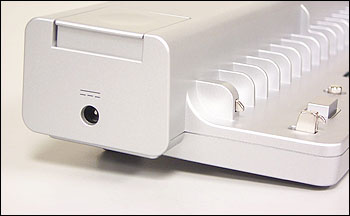
Gateway M450/600 Port Replicator PR9A
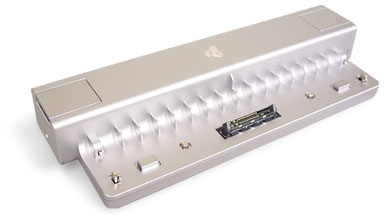
Actual product may vary.
Description
Gateway Port Replicator for use with Gateway 450SX4, 450ROG, 450RGH, M405, 600YGR and 600YG2 Laptop Computers. Gateway model number: RP9A. The optional port replicator is a convenient way to attach external devices such as a monitor, a full-size keyboard, or an AC adapter to your Gateway notebook.
Although devices can be attached directly to the ports on the portable computer, the port replicator lets you make all of those connections in one step. The port replicator also gives you access to additional ports not found on your notebook.
Manufacturer: Gateway
Model Number: PR9A
Part Numbers: 8006012 8006527
Application: Gateway 450SX4 450ROG 450RGH M405 600YGR and 600YG2
*This Port Replicator does not include any cables, will come as pictured below!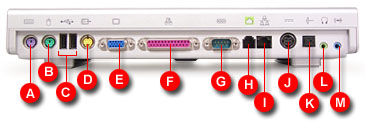
| A. PS/2 keyboard port | Plug a PS/2 keyboard into this port. |
| B. PS/2 mouse port | Plug a PS/2 mouse into this port. |
| C. USB ports | Plug USB devices, such as a USB Iomega™ Zip™ drive, printer, scanner, or camera, into these ports. |
| D. S-Video out jack | Plug a standard S–Video cable into this jack and the jack on an S–Video device. |
| E. Monitor port | Plug an analog VGA monitor into this port. |
| F. Parallel port | Plug a parallel device, such as a printer, into this port. |
| G. Serial port | Plug a serial device, such as a digital camera, into this port. |
| H. Modem jack | Plug a modem cable into this jack. |
| I. Ethernet jack | Supports 10/100 LAN up to 1 Gigabit LAN. |
| J. Power connector | This power connector is for future use. Note: This port replicator has a power connector on the left side, plug the Gateway AC adapter into that connector. |
| K. S/PDIF digital audio jack | Plug an optical Toslink digital audio cable into this jack. |
| L. Headphone jack | Plug amplified speakers or headphones into this jack. The built–in speakers on the portable computer are turned off when speakers or headphones are plugged into this jack. This jack is turned off when headphones are plugged into the portable computer's headphone jack. |
| M. Line in jack | Connect an external audio input source, such as a stereo, to this jack so that you can record sound on your computer or play sound through the computer speakers. |
Specifications:
| Input/Output (I/O ports) | |
| Operating temperature | 5 to 35° C |
| Storage temperature | –20 to 60° C |
| Operating humidity | 20 to 80% RH no condensation |
| Storage humidity | 10 to 90% RH no condensation |
| Operating altitude | 8,000 feet |
| Storage altitude | 12,000 feet |
| Dimensions | 11.93 × 4.21 × 1.73 inches (303 × 107 × 44 mm) |
| Weight | Below 1 kg (2.2 lbs) |
| Agency compliance | System (Safety) – UL, CUL, NOM System (EMC) – FCC |