
GIGABYTE GA-Z87M-D3H Z87 DDR3 SATA3 HDMI
Description
GIGABYTE GA-Z87M-D3H 1.0 LGA 1150 Intel Z87 HDMI SATA 6Gb/s USB 3.0 Micro ATX Intel Motherboard. GIGABYTE 8 Series motherboards support the latest 4th Generation Intel Core processors, bringing together a unique blend of features and technologies that offer the absolute ultimate platform for your next PC build. The latest Intel 8 Series platform offers significant improvements in performance and power consumption with the latest 4th generation Intel Core processors and Intel Z87 chipsets. As well as a boost in overall productivity, the latest HD4600 Intel processor graphics provide native 4K resolution playback over standard HDMI connectivity, with significantly higher frame rates in the latest DX11 3D game titles. From high current capable digital power delivery, performance-enhancing caching technologies, exclusive high-end audio features, advanced networking and device charging, gold plated hardware connectors and of course, killer good looks, GIGABYTE 8 series motherboards are in a class of their own.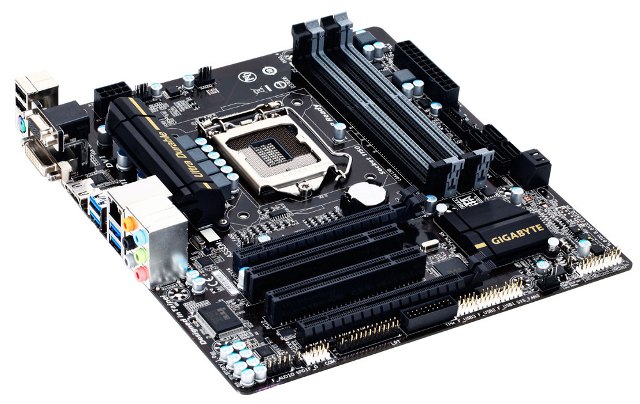
Features:
- Supports 4th Generation Intel® Core™ processors
- GIGABYTE Ultra Durable™ 4 Plus Technology
- GIGABYTE Hybrid Digital Power Engine
- GIGABYTE UEFI DualBIOS™
- 15µ gold plated CPU socket
- Multi-GPU Support
- All solid capacitors
- GIGABYTE On/Off Charge™ for USB devices
- LAN with high ESD Protection
- HDMI 1.4, DVI, D-SUB
Overview:
GIGABYTE Ultra Durable 4 Plus
GIGABYTE Ultra Durable™ 4 Plus debuts on GIGABYTE 8 Series motherboards, with a range of features and component choices that provide record-breaking performance, cool and efficient operation and extended motherboard lifespan.
Ultra Cool - All New Heat Sink Design
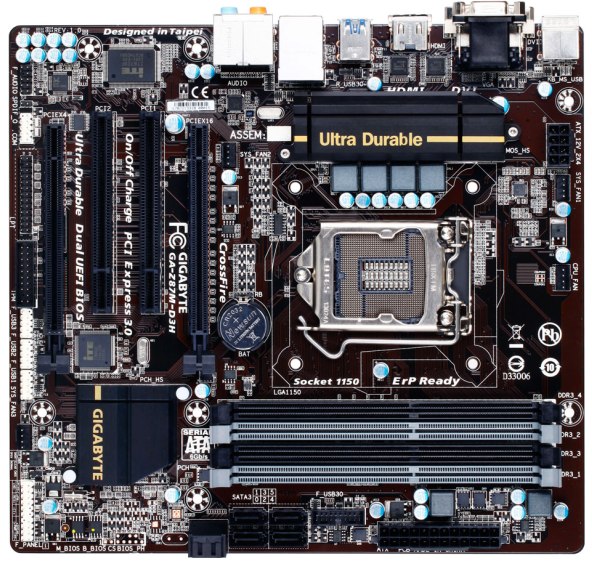
GIGABYTE motherboards feature new heatsink designs that offer uncompromisingly efficient cooling on key areas of the motherboard including the PWM area and chipset (PCH). GIGABYTE 8 Series motherboards offer both passive, active and water cooling support of the crucial PWM area so even the most aggressive and extreme configurations will be kept well within optimal thermal parameters.
Ultra Performance
GIGABYTE uses All Solid Caps (Capacitors) and Low RDS(on) MOSFETs which are rated to work at higher temperatures, providing up to 50,000* hour component lifespan.
Ultra Safe - GIGABYTE UEFI DualBIOS
GIGABYTE motherboards feature GIGABYTE DualBIOS™, an exclusive technology from GIGABYTE that protects arguably one of your PC's most crucial components, the BIOS. GIGABYTE DualBIOS™ means that your motherboard has both a 'Main BIOS' and a 'Backup BIOS', making users protected from BIOS failure due to virus attack, hardware malfunction, improper OC settings or power failure during the update process.
High ESD Protection for USB and LAN
GIGABYTE 8 Series motherboards raise the bar in terms of protecting your system, providing advanced electrostatic discharge (ESD) protection for both your Ethernet LAN and USB ports, both common sources of ESD-related failures. Each LAN and USB port is paired with a dedicated protection filter that can withstand high electrostatic discharges, protecting your system from common electrical surges and even direct lighting strikes.
Gold Plated CPU Socket
GIGABYTE 8 Series motherboards come equipped with a gold plated CPU socket, which means that enthusiasts can enjoy absolute reliability and longevity for the CPU socket overtime, without having any concerns about corroded pins and bad contacts.
One Fuse per USB Port
On GIGABYTE 8 Series motherboards each USB port has its own dedicated power fuse that prevents unwanted USB port failure, helping to safe guard your important data during transfer
Multi-display support with AMD CrossFire
AMD CrossFire™ delivers the ultimate graphics performance for gaming enthusiasts who demand the highest frame rates without compromising on resolution.
HDMI-The Next Generation Multimedia Interface
HDMI is a High-Definition Multimedia Interface which provides up to 5Gb/s video transmitting bandwidth and 8-channel high quality audio all through a single cable. Able to transmit superior, uncompressed digital video and audio, HDMI™ ensures the crispest rendering of digital content up to 1080p without the quality losses associated with analog interfaces and their digital-to-analog conversion. In addition, HDMI™ is compatible with HDCP (High-bandwidth Digital Content Protection), allowing the playback of Blu-ray/HD DVD and other protected media content.
DVI Support
DVI (Digital Visual Interface) is a video interface standard designed for carrying uncompressed digital video data and to maximize the visual quality of digital display devices, such as LCD monitors, digital projectors, and so on. In addition, the DVI interface is compatible with HDCP (High-bandwidth Digital Content Protection).
GIGABYTE App Center
GIGABYTE App Center gives you easy access to wealth of GIGABYTE apps that help you get the most from your GIGABYTE motherboard. Using a simple, unified user interface, GIGABYTE App Center allows you to launch all GIGABYTE apps installed on your system.
GIGABYTE EasyTune
• Simple and easy-to-use interface that allows users to fine-tune their system settings
• Adjust system and memory clocks and voltages in a Windows environment
• System-related information display without the need to install additional software
GIGABYTE Smart Fan 2
As well as offering more system fans than ever before, GIGABYTE 8 Series motherboards feature updated and improved CPU and system fan speed controls, with individual airflow and speed settings available via a dedicated digital controller. GIGABYTE Smart Fan 2 allows you to configure CPU fans and system fans.
GIGABYTE BIOS
The new and updated GIGABYTE @BIOS app allows you to update your system's BIOS from within Windows using a simple and slick graphical user interface by automatically downloading the latest version from the GIGABYTE servers.
GIGABYTE EZ Setup
GIGABYTE EZ Setup combines several key utilities designed to simplify install and configuration procedures for several exclusive GIGABYTE apps including Disk Mode Switch, Smart Connect, EZ Rapid Start and EZ Smart response.
GIGABYTE UEFI DualBIOS
• Take control of how your BIOS looks and feels with a fully customizable UI
• Adjust overclocking and performance settings in real-time
• Smooth mouse control and shortcuts for fast navigation
GIGABYTE's new Dashboard mode allows users to have complete access to all data related to your motherboards key components including CPU, graphics and memory clocks, temperatures and voltages.
For the first time ever, overclockers can adjust CPU clock, frequency and voltage settings in real-time within BIOS. This massively saves time, allowing users to find optimal settings without having to reboot.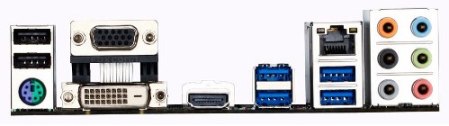
Specifications:
| CPU | |
| Chipset | |
| Memory | |
| Onboard Graphics | Integrated Graphics Processor: * The DVI-D port does not support D-Sub connection by adapter. * Support for HDMI 1.4a version. |
| Audio | * To configure 7.1-channel audio, you have to use an HD front panel audio module and enable the multi-channel audio feature through the audio driver. |
| LAN | |
| Expansion Slots | * For optimum performance, if only one PCI Express graphics card is to be installed, be sure to install it in the PCIEX16 slot. (The PCIEX16 slot conforms to PCI Express 3.0 standard.) (The PCIEX4 slot conforms to PCI Express 2.0 standard.) |
| Multi-Graphics Technology | |
| Storage Interface | Chipset: |
| USB | Chipset: |
| Internal I/O Connectors | |
| Back Panel Connectors | |
| I/O Controller | |
| H/W Monitoring | * Whether the fan speed control function is supported will depend on the cooler you install. |
| BIOS | |
| Unique Features | |
| Operating System | |
| Form Factor |
CPU Support List:
| Processor | Core Name | CPU No | FSB | CPU Speed | L2 | L3 | Stepping | Wattage | GPU |
| Core i7 | Haswell | i7-4770T | 100 | 2.5 | 1M | 6M | C0 | 45 | HD Graphics 4600 350MHz |
| Core i7 | Haswell | i7-4770S | 100 | 3.1 | 1M | 6M | C0 | 65 | HD Graphics 4600 350MHz |
| Core i7 | Haswell | i7-4770K | 100 | 3.5 | 1M | 8M | C0 | 84 | HD Graphics 4600 350MHz |
| Core i7 | Haswell | i7-4770 | 100 | 3.4 | 1M | 8M | C0 | 84 | HD Graphics 4600 350MHz |
| Core i7 | Haswell | i7-4765T | 100 | 2.0 | 1M | 8M | C0 | 35 | N/A |
| Core i5 | Haswell | i5-4670T | 100 | 2.3 | 1M | 6M | C0 | 45 | HD Graphics 4600 350MHz |
| Core i5 | Haswell | i5-4670S | 100 | 3.1 | 1M | 6M | C0 | 65 | HD Graphics 4600 350MHz |
| Core i5 | Haswell | i5-4670K | 100 | 3.4 | 1M | 6M | C0 | 84 | HD Graphics 4600 350MHz |
| Core i5 | Haswell | i5-4670 | 100 | 3.4 | 1M | 6M | C0 | 84 | N/A |
| Core i5 | Haswell | i5-4570T | 100 | 2.9 | 512KB | 4M | C0 | 35 | HD Graphics 4600 200MHz |
| Core i5 | Haswell | i5-4570S | 100 | 2.9 | 1M | 6M | C0 | 65 | HD Graphics 4600 350MHz |
| Core i5 | Haswell | i5-4570 | 100 | 3.2 | 1M | 6M | C0 | 84 | HD Graphics 4600 350MHz |
| Core i5 | Haswell | i5-4430S | 100 | 2.7 | 1M | 6M | C0 | 65 | HD Graphics 4600 350MHz |
| Core i5 | Haswell | i5-4430 | 100 | 3 | 1M | 6M | C0 | 84 | HD Graphics 4600 350MHz |