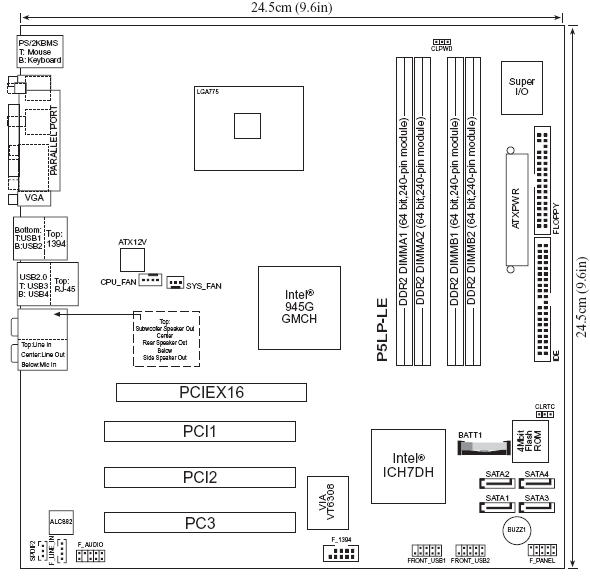
HP Compaq Leucite-UL8E Asus P5LP-LE
We apologize but this item is currently unavailable. Please feel free to browse our website for other available items.
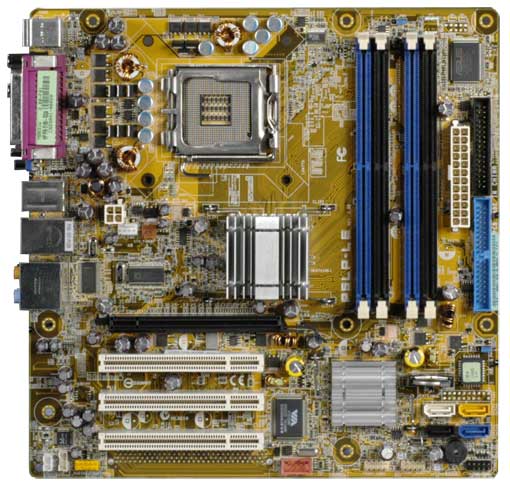
Enlarge
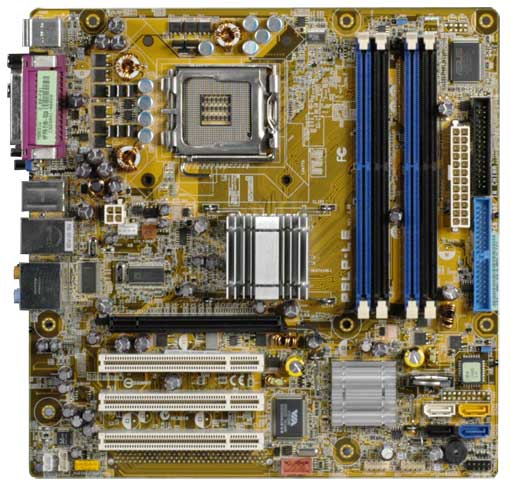
*Note this image is for descriptional purposes.
Actual product may vary.
Actual product may vary.
Description
HP / Compaq Leucite-UL8E Asus P5LP-LE Intel 945G Chipset 1066Mhz FSB DDR-2 SATA PCI-Express x16 With OnBoard Video, 8-Channel Audio & 10/100Mbps Ethernet Adapter (LAN).
Related Part Numbers: 5188-5465
HP Pavilion Media Center TV m8000y CTO Desktop PC
HP Pavilion d4600y CTO Desktop PC
HP Pavilion d4790.se Desktop PC
Specifications:
| Motherboard description |
|
| CPU/Processor |
|
| Front-side bus (FSB) |
|
| Chipset |
|
| BIOS features |
|
| Form factor |
|
| Memory |
|
| Expansion slots |
|
| Video graphics |
|
| Serial ATA |
|
| Onboard audio |
|
| Onboard LAN |
|
| Back panel I/0 |
|
| Internal connectors |
|
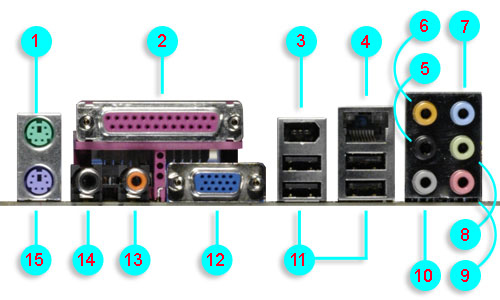
1) - PS/2 mouse port (green). This port is for a PS/2 mouse.
2) - Parallel port. This 25-pin port connects a parallel printer, a scanner, or other devices.
3) - IEEE 1394a port. This 6-pin IEEE 1394a port provides high-speed connectivity for audio/video devices, storage peripherals, PCs, or portable devices.
4) - LAN (RJ-45) port. This port allows connection to a Local Area Network (LAN) through a network hub.
5) - Rear Speaker Out port (black). This port connects to the rear speakers on a 4-channel, 6-channel, or 8-channel audio configuration.
6) - Center/Subwoofer port (yellow orange). This port connects the center/subwoofer speakers.
7) - Line In port (light blue). This port connects a tape, CD, DVD player or other audio sources.
8) - Line Out port (lime). This port connects a headphone or a speaker. In 4-channel, 6-channel, and 8-channel mode, the function of this port becomes Front Speaker Out.
9) - Microphone port (pink). This port connects a microphone.
10) - Side Speaker Out port (gray). This port connects to the side speakers in an 8-channel audio configuration.
11) - USB 2.0 ports 1, 2, 3, and 4. These four 4-pin Universal Serial Bus (USB) ports are available for connecting USB 2.0 devices.
12) - Video Graphics Adapter port. This 15-pin port is for a VGA monitor or other VGA-compatible devices.
13) - Coaxial SPDIF Out port. This port connects an external audio output device via a coaxial SPDIF cable.
14) - Coaxial SPDIF In port. This port connects an external audio input device via a coaxial SPDIF cable.
15) - PS/2 keyboard port (purple). This port is for a PS/2 keyboard.
2) - Parallel port. This 25-pin port connects a parallel printer, a scanner, or other devices.
3) - IEEE 1394a port. This 6-pin IEEE 1394a port provides high-speed connectivity for audio/video devices, storage peripherals, PCs, or portable devices.
4) - LAN (RJ-45) port. This port allows connection to a Local Area Network (LAN) through a network hub.
5) - Rear Speaker Out port (black). This port connects to the rear speakers on a 4-channel, 6-channel, or 8-channel audio configuration.
6) - Center/Subwoofer port (yellow orange). This port connects the center/subwoofer speakers.
7) - Line In port (light blue). This port connects a tape, CD, DVD player or other audio sources.
8) - Line Out port (lime). This port connects a headphone or a speaker. In 4-channel, 6-channel, and 8-channel mode, the function of this port becomes Front Speaker Out.
9) - Microphone port (pink). This port connects a microphone.
10) - Side Speaker Out port (gray). This port connects to the side speakers in an 8-channel audio configuration.
11) - USB 2.0 ports 1, 2, 3, and 4. These four 4-pin Universal Serial Bus (USB) ports are available for connecting USB 2.0 devices.
12) - Video Graphics Adapter port. This 15-pin port is for a VGA monitor or other VGA-compatible devices.
13) - Coaxial SPDIF Out port. This port connects an external audio output device via a coaxial SPDIF cable.
14) - Coaxial SPDIF In port. This port connects an external audio input device via a coaxial SPDIF cable.
15) - PS/2 keyboard port (purple). This port is for a PS/2 keyboard.